> For the complete documentation index, see [llms.txt](https://wallee.gitbook.io/documentation/llms.txt). Markdown versions of documentation pages are available by appending `.md` to page URLs; this page is available as [Markdown](https://wallee.gitbook.io/documentation/faq/e-commerce-troubleshooting-and-handling/error-messages/why-is-a-404-page-not-found-shown-in-my-shop-instead-of-redirecting-to-the-checkout-page.md).
# Why is a '404 Page Not Found' shown in my shop instead of redirecting to the checkout page?
The message '404 Page Not Found' appears in your shop instead of redirecting to the checkout page. This indicates that we redirect to a WordPress page which does not exists. This happens when the page we have inserted does not exists. We use this page to trigger the payment flow.
This typically occurs if your shop is available in several languages and if you are using the Multilingual Plugin of WordPress (**WPML**).
In that case, the checkout page generated by our module in your WooCommerce backend may not be duplicated for all languages.
## Resolution when using `WPML`
You should duplicate the checkout page of our module for all languages under `Pages > All pages`.
In order to do so please follow the steps below:
1. Go to your WooCommerce backend and open the `Pages` tab. There you should find a page called `_Checkout`.
2. Open the page.
3. On the right hand side under `languages` you should duplicate the content of this page for all of your installed languages. When you have successfully saved the changes, this page will be active for all of your languages and the error should have disappeared.
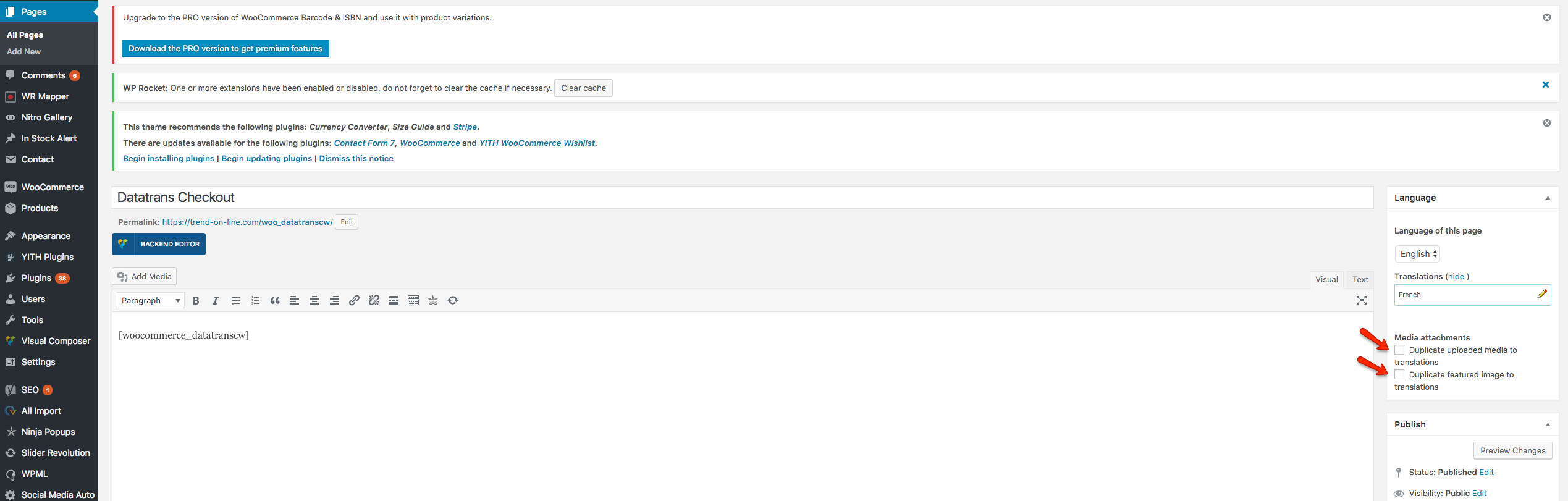
If the issue persists after following above steps, you should try to:
1. Delete the `_Checkout` page and remove it also from the trash.
2. Deactivate and reactivate our payment plugin under `Plugins`.
3. Go to your Wordpress backend and open the 'Pages' tab. There you should find a page called `_Checkout`.
4. Open the page.
5. On the right hand side under `Languages` you can now duplicate the content of this page for all of your installed languages. When you have successfully saved the changes, this page will be active for all of your languages and the error should have disappeared.
## Resolution without `WPML`
When you are not using `WPML` and you have this issue you should follow the steps below:
1. Delete the `_Checkout` page and remove it also from the trash.
2. Deactivate and reactivate our payment plugin under `Plugins`.